A clean, step-by-step walkthrough for installing TACZ Mod with Forge, adding gun packs, and confirming everything loads.
Before You Start
TACZ Mod (Timeless and Classics Zero) is a Minecraft Java Edition mod, so you need the Java version of the game, not Bedrock. Most players run it on Minecraft 1.20.1 with Forge, which is the combination this guide uses. Always check the file list on the official download page for the exact Minecraft and Forge versions each release supports.
- Minecraft: Java Edition, launched at least once so the game folders exist.
- Java 17 (bundled with the official launcher for 1.20.1).
- The Forge installer that matches your Minecraft version.
- The TACZ
.jarfile from our download section, which links to CurseForge and Modrinth.
Install Forge First
Forge is the mod loader that lets Minecraft read TACZ. Download the installer for 1.20.1 from the official Forge site, run it, choose Install client, and point it at your .minecraft folder if it is not detected automatically.
Open the Minecraft Launcher, pick the new forge 1.20.1 profile, and press Play once. This first launch builds the mods folder. Close the game after you reach the title screen.
Add the TACZ Jar
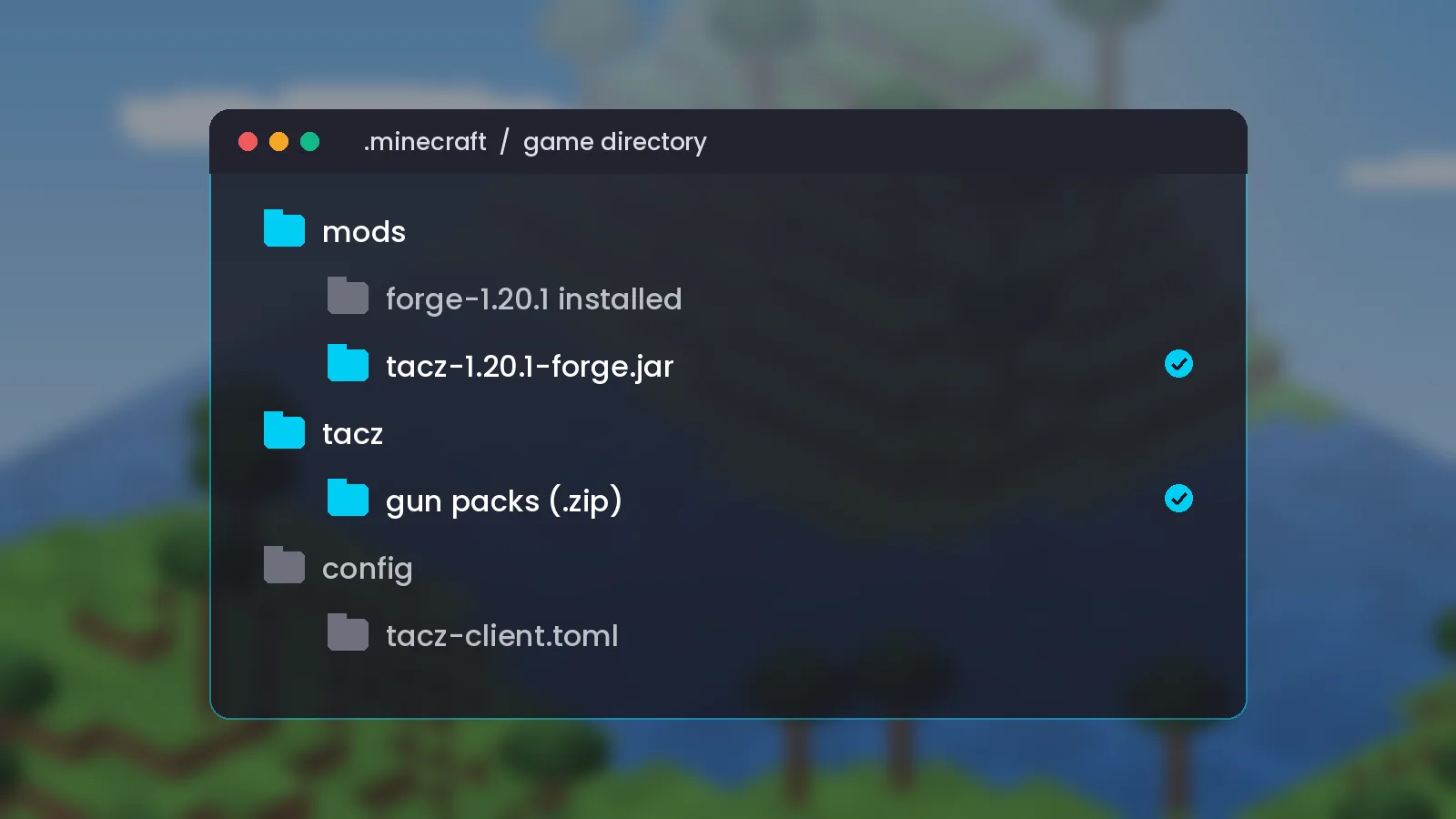
Open your game directory. On Windows press Win + R, type %appdata%\.minecraft and press Enter. On macOS it is ~/Library/Application Support/minecraft, and on Linux ~/.minecraft.
- Open the
modsfolder. - Drag the TACZ
.jarinto it. Do not unzip it. - Launch the Forge profile again.
On first launch TACZ creates its own tacz folder next to mods. That folder is where gun packs live.
Install Gun Packs
TACZ ships with a default pack of weapons, and the community publishes many more. Gun packs are .zip files that go inside the tacz folder, not the mods folder. Leave them zipped unless the pack author says otherwise, then restart the game. Our gun pack guide covers what to look for.
Check It Worked
From the title screen, click Mods and look for TACZ in the list. In a creative world, open the inventory and search for the TACZ tab; you should see guns, ammo, attachments and the Gun Smith Table, the block you use to craft them in survival.
Quick Fixes
If the game crashes on launch, the usual causes are a Forge version mismatch, a missing Java 17 runtime, or two copies of TACZ in the mods folder. Delete duplicates, match versions exactly, and read the crash report in crash-reports. The troubleshooting section lists more fixes, and our performance guide helps if FPS drops after installing.